
Aadhaar Card Download 2026 – Get e-Aadhaar UIDAI
Aadhaar card is one of the most important identity documents in India. It is used for banking, government schemes, SIM cards, verification, and many daily services.
Aadhaar is issued and managed by Unique Identification Authority of India (UIDAI).
Today, Aadhaar is also available in digital form, and online aadhaar card download is easy.
What Is e-Aadhaar?
e-Aadhaar is the digital version of your Aadhaar card. It is issued and digitally signed by UIDAI, which makes it completely safe and official. You can download either Regular Aadhaar (displaying the full 12-digit number) or Masked Aadhaar.
e-Aadhaar contains:
- 12-digit Aadhaar number
- Name
- Address
- Date of birth
- Gender
- Photograph
- Secure QR code
Important:
As per Aadhaar Act 2016, e-Aadhaar is legally valid and accepted everywhere in India as proof of identity and address.
Prerequisites for Downloading Aadhaar
Make sure you have:
- Aadhaar Number (12 digits) OR
- Enrolment ID (28 digits) OR
- Virtual ID (16 digits)
- Mobile number linked with Aadhaar (for OTP)
- Internet connection
- PDF reader (Chrome, Edge, Adobe)
If your mobile number is not linked, you must visit Aadhaar Seva Kendra.
Methods to Download Aadhaar Card
You can download Aadhaar in multiple official ways.
1. Downloading via UIDAI Website (myAadhaar Portal)
This is the most trusted and direct method.
- Go to https://myaadhaar.uidai.gov.in/ to open UIDAI website.
- Click Download Aadhaar

- Choose one option:
- Aadhaar Number
- Enrolment ID (EID)
- Virtual ID (VID)
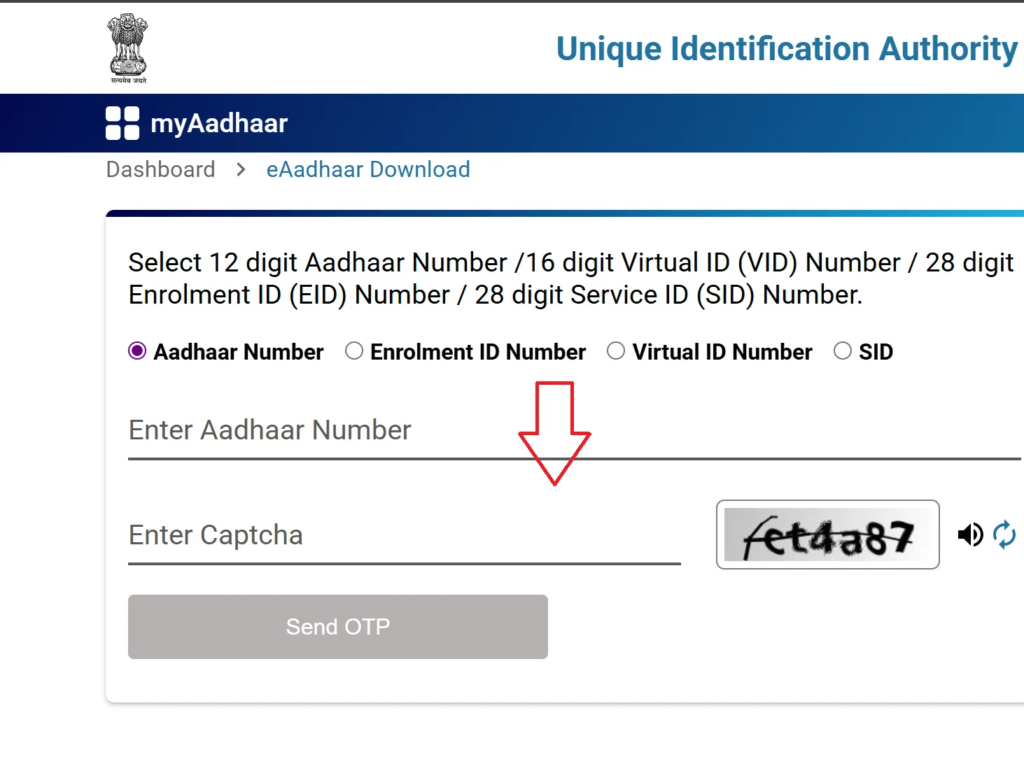
- Enter captcha
- Click Send OTP
- Enter OTP received on registered mobile
- Choose Regular or Masked Aadhaar
- Click Verify & Download
- Open PDF using Aadhaar password
Latest updated details appear automatically.
2. Download Aadhaar Using mAadhaar App
mAadhaar is official mobile app by UIDAI.
- Install mAadhaar app from Play Store or App Store
- Open app and select language
- Login using registered mobile number
- Verify OTP
- Go to Download Aadhaar
- Enter Aadhaar / EID / VID
- Verify using OTP or TOTP
- Download e aadhar card download online pdf
You can also:
- Lock or unlock biometrics
- Verify Aadhaar
- Order PVC card
Note: Only address update is available in app.
3. Download Aadhaar from DigiLocker
DigiLocker https://www.digilocker.gov.in/ stores official digital documents securely.
- Login to DigiLocker website or app
- Sign in using mobile/Aadhaar
- Search UIDAI

- Select Aadhaar
- Enter Aadhaar number
- Verify OTP
- Download Aadhaar PDF

4: Download Aadhaar Using Name & Date of Birth
If you forgot Aadhaar number or EID, don’t worry.
- Visit My Aadhaar portal https://myaadhaar.uidai.gov.in/
- Click Retrieve EID / Aadhaar Number

- Enter name, DOB, mobile/email
- Verify OTP

- Receive Aadhaar or EID
- Use it to download Aadhaar
5. Download Without Registered Mobile Number
Online download is not possible without registered mobile.
- Visit nearest Aadhaar Seva Kendra
- Complete biometric verification
- Carry any valid ID proof
- Get Aadhaar printout
Charges:
- Normal print: ₹30
- PVC card: ₹50
Printing Your e-Aadhaar
Downloaded e-Aadhaar can be printed and used like physical card.
- Open PDF
- Enter password
- Click Print
Printed e-Aadhaar is 100% valid.
Masked Aadhaar Card
Masked Aadhaar hides first 8 digits of Aadhaar number.
Why Use Masked Aadhaar?
- Better privacy
- Less risk of misuse
- Safe for KYC, rentals, offices
Features
- Shows only last 4 digits
- Fully valid everywhere
- Free to download
- Includes QR code for verification
Download Masked Aadhaar Card
- Open My Aadhaar portal
- Click Download Aadhaar

- Enter Aadhaar or VID
- Select Masked Aadhaar
- Verify OTP
- Download PDF

e-Aadhaar Download – (FAQs)
Is downloaded e-Aadhaar valid?
Yes. It is digitally signed by UIDAI and legally accepted everywhere.
Can I download Aadhaar multiple times?
Yes. There is no limit and no charge.
Can I download Aadhaar from outside India?
Yes, if you can receive OTP on your registered Indian mobile number.
What if Aadhaar OTP is not coming?
Check network
Wait few minutes
Retry OTP
Visit Aadhaar Seva Kendra if problem continues
Can I download Aadhaar using mobile number?
Yes. OTP is sent to registered mobile number for verification.


